
Mystic Apple in Water Locker3.4 - Google Play
You'll be able to see results in few seconds.
Publisher Description
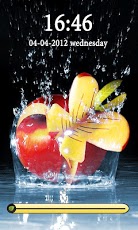
Mystic apple in Water HD GoLocker. This android app is a custom and traditional lockscreen replacement application with the image of apple soaked in water as the background.Have an amazing and elegant, fashion and trendy HD Golocker screen in a way very similar to the iphone go locker theme screen. Just slide to unlock the phone, a very easy, stylish and simple method for locking and unlocking the phone.It makes your phone look very modern , full of style similar and alike to apple products like iphone and ipad.Fashion and Trendy jeans Locker for summer style look Theme, design to GO Launcher EX, is available now!Click “MENU—->Preferences—->Theme Settings—->GO Locker---->My locker†to choose the theme.Get this awesome apple locker to match the latest trends in locker screens. A must have golocker for those who is fan of having high quality HD graphics on their precious and worthless android phones.This beautiful waalpaper cum locker shows a multi colored apple completely soaked in water. The rising ephemeral water droplets gives it an awesome look. The apple is put in a bowl that seems to be filled with water. Due to this effect, an impression of 3D look is being obtained. The reason for choosing apple is because "The great Alan Turing" is realted to apple, It is a tribute to Mr. Turing from our side. Besides , it is one of the most nutritous food available with quotes like "An apple a day keeps a doctor away" associated with it. USE INSTRUCTIONS:1. Go to MENU->Preferences->Theme Settings—>GO Locker to choose the theme2. Enable Go Locker from Go Locker settings3. Exit the app. Important instruction: GO Launcher EX V2.67 or above and GO Locker v1.05 should be installed on your phone to get this go locker theme lock screen app working Features:-Beautiful HD wallpaper image of high quality graphics.-matching sliders with the background. ************************************************************END USER LICENSE AGREEMENT:All images used in this software product are owned by and are copyright of the respective owner. All title and intellectual property rights in and to the content which may be accessed through use of the software is the property of the respective content owner and may be protected by applicable copyright or other intellectual property laws and treaties. You have no right to use this content.The theme does not need ADW or Magic Locker to install you only need to have go locker on your android device to get this of application working.It will be great if you can also download our other go locker themes with varieties of beautiful backgrounds that will encourage to launch more and more applications. The application has been tested extensively on various models of Samsung Galxy, HTC One, HTC Desire and wildfire , sony xperia and Motorola Defy and Motorola Fire, Stay updated since we will be launching more Go Locker themes to the android market for better customization of the android phone. The themes will include a wide range of topics from abstract , God, funny cartoons and beautiful landscapes, abstract,fruits, etc. If you like it, then please share it on facebook,have a wonderful tweet on twitter about it, or just simple google +1 it.That will encourage us a lot for providing more better and useful content for our users. Tags:apple, 3D, water, blue, healthy, golocker, locker, theme, golocker theme, Go Locker.
About Mystic Apple in Water Locker
The company that develops Mystic Apple in Water Locker is GalaxySoft. The latest version released by its developer is 3.4.
To install Mystic Apple in Water Locker on your Android device, just click the green Continue To App button above to start the installation process. The app is listed on our website since 2012-09-03 and was downloaded 0 times. We have already checked if the download link is safe, however for your own protection we recommend that you scan the downloaded app with your antivirus. Your antivirus may detect the Mystic Apple in Water Locker as malware if the download link to com.microdev.waterapple is broken.
How to install Mystic Apple in Water Locker on your Android device:
- Click on the Continue To App button on our website. This will redirect you to Google Play.
- Once the Mystic Apple in Water Locker is shown in the Google Play listing of your Android device, you can start its download and installation. Tap on the Install button located below the search bar and to the right of the app icon.
- A pop-up window with the permissions required by Mystic Apple in Water Locker will be shown. Click on Accept to continue the process.
- Mystic Apple in Water Locker will be downloaded onto your device, displaying a progress. Once the download completes, the installation will start and you'll get a notification after the installation is finished.
Program Details
System requirements
Download information
Pricing
Version History
version 3.4
posted on 2012-09-03
version 3.4
posted on 2012-09-03
Several fixes and updates
Disclaimer
Official Google Play Link
We do not host Mystic Apple in Water Locker on our servers. We did not scan it for viruses, adware, spyware or other type of malware. This app is hosted by Google and passed their terms and conditions to be listed there. We recommend caution when installing it.
The Google Play link for Mystic Apple in Water Locker is provided to you by apps112.com without any warranties, representations or guarantees of any kind, so access it at your own risk.
If you have questions regarding this particular app contact the publisher directly. For questions about the functionalities of apps112.com contact us.
